
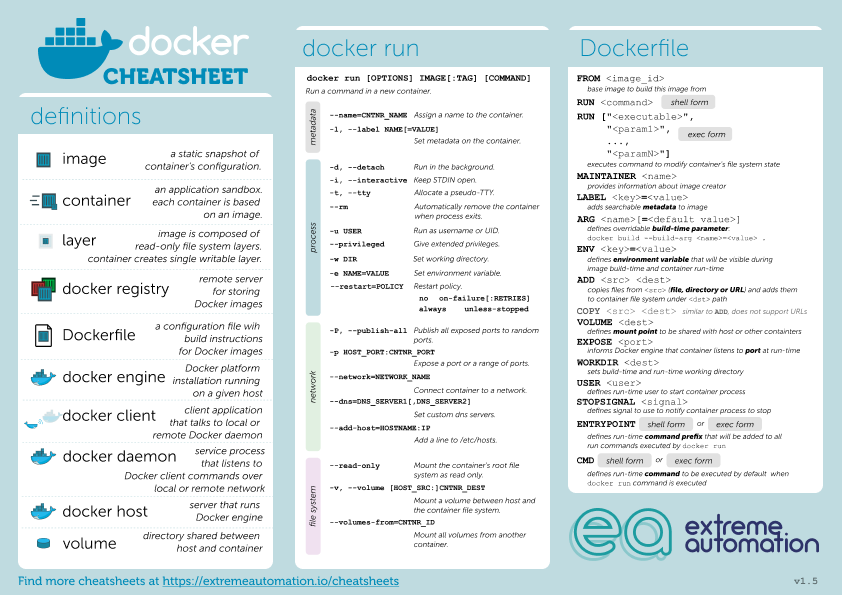
A one-page Docker reference
Docker packages an application together with everything it needs into an image, and runs it as an isolated container. This cheat sheet fits the parts of Docker you reach for every day onto a single A4 page: the vocabulary, the docker run options and the Dockerfile instructions.
What's on the Docker cheat sheet
Docker concepts
Short definitions of image, container, layer, Docker registry, Dockerfile, Docker engine, client, daemon, host and volume, and how they relate: an image is built from read-only layers, and each container adds a single writable layer on top.
docker run options
The docker run [OPTIONS] IMAGE[:TAG] [COMMAND] flags, grouped by what they control:
- Metadata:
--name,--label - Process:
-d,-i,-t,--rm,-u,--privileged,-w,-eand--restartpolicies (no,on-failure,always,unless-stopped) - Network:
-pand-Pport publishing,--network,--dns,--add-host - File system:
-vvolumes,--volumes-from,--read-only
Dockerfile instructions
FROM, RUN, LABEL, ARG, ENV, ADD, COPY, VOLUME, EXPOSE, WORKDIR, USER, STOPSIGNAL, ENTRYPOINT and CMD, including the difference between the shell form and the exec form of RUN, ENTRYPOINT and CMD, and between ADD and COPY. The sheet also lists MAINTAINER, which Docker has since deprecated in favour of a LABEL.
How to use it
Download the PDF and print it on A4 in landscape, or keep it open next to your terminal. It covers the Docker CLI and Dockerfile syntax, not Docker Compose or Kubernetes.
Want to go deeper? The Containerization 101 course covers this hands-on.